If you are using Apache Solr, install it using the Ambari HDP Search management
pack.
-
From Ambari, stop the following:
- Metron
- Kibana
- Elasticsearch
-
Install the Ambari HDP Search Management pack.
The Meta Alerts UI feature with Solr is technical preview in this release. We do
not yet recommend this for production use, but please let us know about any bugs you
might find. We appreciate your feedback.
 | Important |
|---|
Ensure the Java threat stack size parameter is set to greater
than 320kb. The default setting for SOLR_JAVA_STACK_SIZE is not
sufficient to start the Solr service. |
-
In Ambari, navigate to the Metron Indexing Settings
tab.
-
Append
/solr to the end of the host information in Solr
ZooKeeper Urls.
-
Copy the Metron schema files located at
$METRON_HOME/config/schema
to the Solr node.
-
Set the
SOLR_HOME and SOLR_USER environment
variables.
In HDP Search, the SOLR_HOME path is
/opt/lucidworks-hdpsearch/solr/.
export SOLR_HOME=/opt/lucidworks-hdpsearch/solr/
export SOLR_USER=solr
-
Create a collection for error and metaalert:
su $SOLR_USER -c "$SOLR_HOME/bin/solr create -c error -d $METRON_HOME/config/schema/error/"
su $SOLR_USER -c "$SOLR_HOME/bin/solr create -c metaalert -d $METRON_HOME/config/schema/metaalert/"
-
Create a collection for each of the sensors you are running.
For example to create a collection for bro, snort, and yaf:
su $SOLR_USER -c "$SOLR_HOME/bin/solr create -c bro -d $METRON_HOME/config/schema/bro/"
su $SOLR_USER -c "$SOLR_HOME/bin/solr create -c snort -d $METRON_HOME/config/schema/snort/"
su $SOLR_USER -c "$SOLR_HOME/bin/solr create -c yaf -d $METRON_HOME/config/schema/yaf/"
-
Pull all configurations from ZooKeeper to the Metron
config
directory:
$METRON_HOME/bin/zk_load_configs.sh -m PULL -z $ZOOKEEPER -o $METRON_HOME/config/zookeeper -f
-
Add
"source.type.field" : "source.type" to the
global.json file located
at$METRON_HOME/config/zookeeper/global.json:
$METRON_HOME/bin/zk_load_configs.sh -m PULL -z $ZOOKEEPER -i $METRON_HOME/config/zookeeper -f
The global.json file should look similar to:
{
  "es.clustername" : "metron",
  "es.ip" : "blah:9300",
  "es.date.format" : "yyyy.MM.dd.HH",
  "parser.error.topic" : "indexing",
  "update.hbase.table" : "metron_update",
  "update.hbase.cf" : "t",
  "es.client.settings" : {
    "client.transport.ping_timeout" : "500s"
  },
  "solr.zookeeper" : "ip-10-0-0-164.us-west-1.compute.internal:2181/solr",
  "source.type.field" : "source.type",
  "profiler.client.period.duration" : "15",
  "profiler.client.period.duration.units" : "MINUTES",
  "user.settings.hbase.table" : "user_settings",
  "user.settings.hbase.cf" : "cf",
  "geo.hdfs.file" : "/apps/metron/geo/default/GeoLite2-City.mmdb.gz"
}
-
Push the configuration to ZooKeeper:
$METRON_HOME/bin/zk_load_configs.sh -m PUSH -z $ZOOKEEPER -i $METRON_HOME/config/zookeeper
-
In Swagger, change the globalconfig file
sourcetype field from
threat.triage.score.field to
source.type.field.
-
Stop and restart Solr.
-
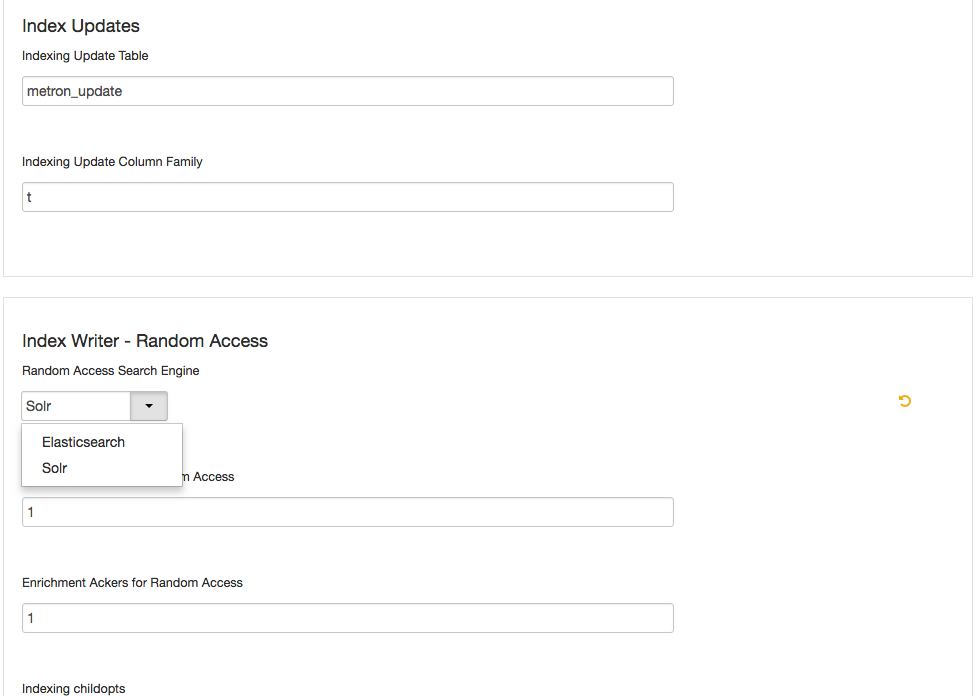
From Ambari, select Metron in the components panel.
-
Click the Configs tab, then click the
Indexing tab.
-
Choose Solr in the Index Writer - Random
Access pull down menu.
-
Click Save.
-
From Ambari, stop and restart the Metron Alerts user interface.
-
From Ambari, stop and restart Metron REST.
This will automatically create collections for the schemas shipped with HCS
You can access Solr by choosing Solr
UI from the Quick Links pull down menu in
Ambari.