

Creating a smoketest user enables you to run HDP smoke tests
without having to run them as the hadoop user.
To create a smoketest user:
Open a command prompt as the
hadoopuser:runas /user:hadoop cmdChange permissions on the MapReduce directory to include other users:
%HADOOP_HOME%\bin\hdfs fs -chmod -R 757 /mapredCreate an HDFS directory for the smoketest user:
%HADOOP_HOME%\bin\hdfs dfs -mkdir -p /user/smoketestuserChange ownership to the smoketest user.
%HADOOP_HOME%\bin\hdfs dfs -chown -R smoketestuser /user/smoketestuserCreate a smoketest user account in Windows:
Navigate to
Computer Management.Select
Local Users and Groups > File > Action > New Useron Windows Server 2008 orLocal Users and Groups > Action > New Useron Windows Server 2012. The New User dialog displays: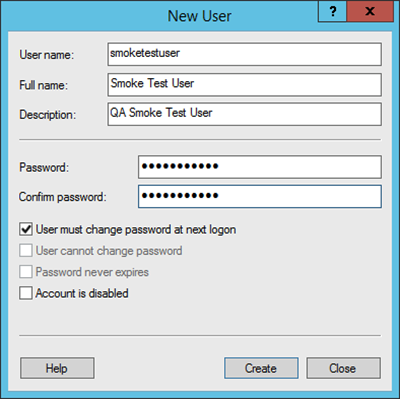
Create the username and password for your
smoketestuser. Determine password requirements and selectCreate.
Validate the
smoketestuser by running the smoke tests as thesmoketestuser.Switch to a command prompt as the
smoketestuser. For example:runas /user:smoketestuser cmdAs the
smoketestuser, run the smoke tests:%HADOOP_NODE%\Run-Smoketests.cmd
