
Displaying Additional Alerts Information
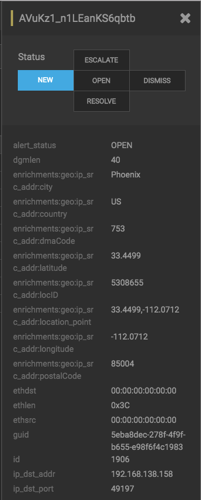
In addition to displaying alert information in the Alerts table, you can display all the information about the alert in Elasticsearch in a separate panel.
To display this additional information about the alert, complete the following steps:
Select an alert by clicking on empty space in the alert row.
The Alerts UI displays a panel listing all available data in Elasticsearch about the alert.
The Status states at the top of the panel display the current status of the alert.